Navigate to the Human Resources > Settings tab and you will be taken into the Contract type tab. Here you can add in a contract type by selecting the Add button.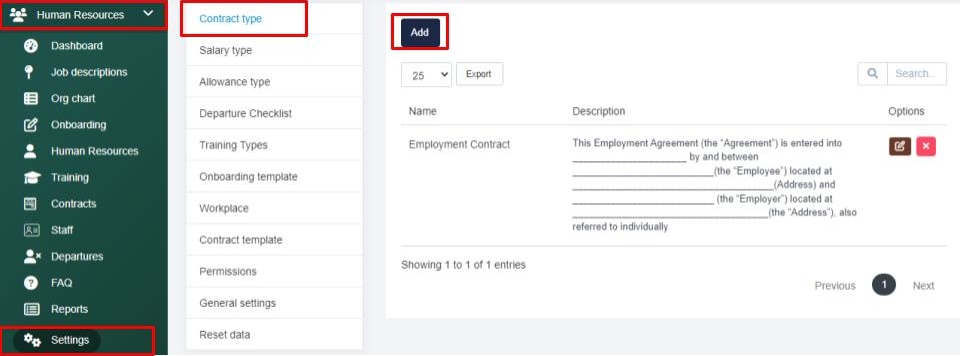
From there you can give your contract a name and paste your contract template into the description section and Save your contract type. 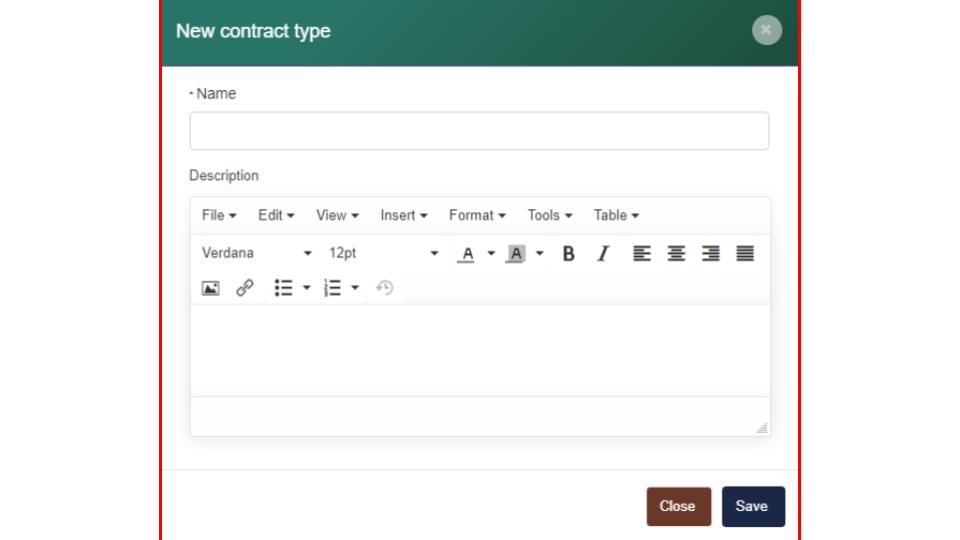
Search Knowledge Base Articles
How can I manage my contract types within the Human Resource section?
Did you find this article useful?
Related Articles
-
How can I update the salary types within the Human Resource section?
Navigate to the Human Resources > Settings tab and select into the Salary type tab. Next select t... -
How can I manage the allowance types within the Human Resource section?
Navigate to the Human Resources > Settings tab and select the Allowance type tab. Next, select th... -
How can I customize my HR departure checklist?
Navigate to the Human Resources > Settings tab and select into the Departure Checklist tab. Next ... -
How can I manage my training types within the Human Resource section?
To manage the training type options available within the training section located within the Human R... -
How can I manage my onboarding template within the Human Resource section?
Navigate to the Human Resources > Settings tab and select the Onboarding template tab. Here you c...